





The Bloomberg Terminal is the tool many people picture when they think of professional investing: screens of live prices, news, research and chat with other market professionals. It is built for banks, funds and other firms, and it is priced for them too. For someone investing their own money, most of what it does is either out of reach or more than they need.
The good news is that several web tools now give everyday investors a big share of the research side for little or nothing. This page covers five Bloomberg Terminal alternatives for people on a budget: what each one does well, what it costs, and what it cannot do that the Terminal can. Facts come from the official pages, read on 4 Nov 2026. It is general information, not advice.
Koyfin's free plan is the closest budget match to a terminal-style screen, but none of these tools replaces the Terminal for live trading desks or professional messaging.
What the Bloomberg Terminal does, and what it costs
Bloomberg describes the Terminal as a single system for financial professionals, with data, news, research and analytics across all asset classes. Its product page lists research from Bloomberg Intelligence, news, charts, portfolio analytics, trade execution tools, an AI assistant called ASKB, and Instant Bloomberg, a messaging network it says reaches more than 350,000 people in finance (Bloomberg Terminal).
Bloomberg does not show a price on its site. On 4 Nov 2026 its “Order the Bloomberg Terminal” page was a contact form asking for a business email and phone number, with no price listed (order page). Industry reports put the cost at tens of thousands of US dollars a year for a single user, but Bloomberg does not confirm a figure publicly, so treat any number you read as an estimate.
For a private investor, that is the main reason to look elsewhere. The tools below cost a small fraction of that, and most have a free plan or a free trial.
The alternatives at a glance
| Tool | Best for | Free plan | Paid from | Markets |
|---|---|---|---|---|
| Koyfin | Terminal-style dashboards, charts and financials | Yes | USD 39 a month billed yearly | Many markets; prices outside the US and Canada are end of day |
| Fiscal.ai | Deep company financials, segments and earnings calls | No (7-day free trial) | USD 39 a month billed yearly | 100,000+ companies, ETFs and funds worldwide |
| Stock Rover | Screening and research on US and Canadian stocks | Yes | USD 29 a month billed yearly | North American exchanges only |
| InvestingPro | Fair value estimates and data on many markets | No | USD 18.95 a month billed monthly | US and 70+ other markets |
| Yahoo Finance | Free quotes, news and portfolios | Yes | USD 7.95 a month billed yearly (Bronze) | Many markets, including London, Xetra and Dubai |
Prices are in US dollars, from each tool’s official pricing page, and can change.
Koyfin: the closest to a terminal-style screen
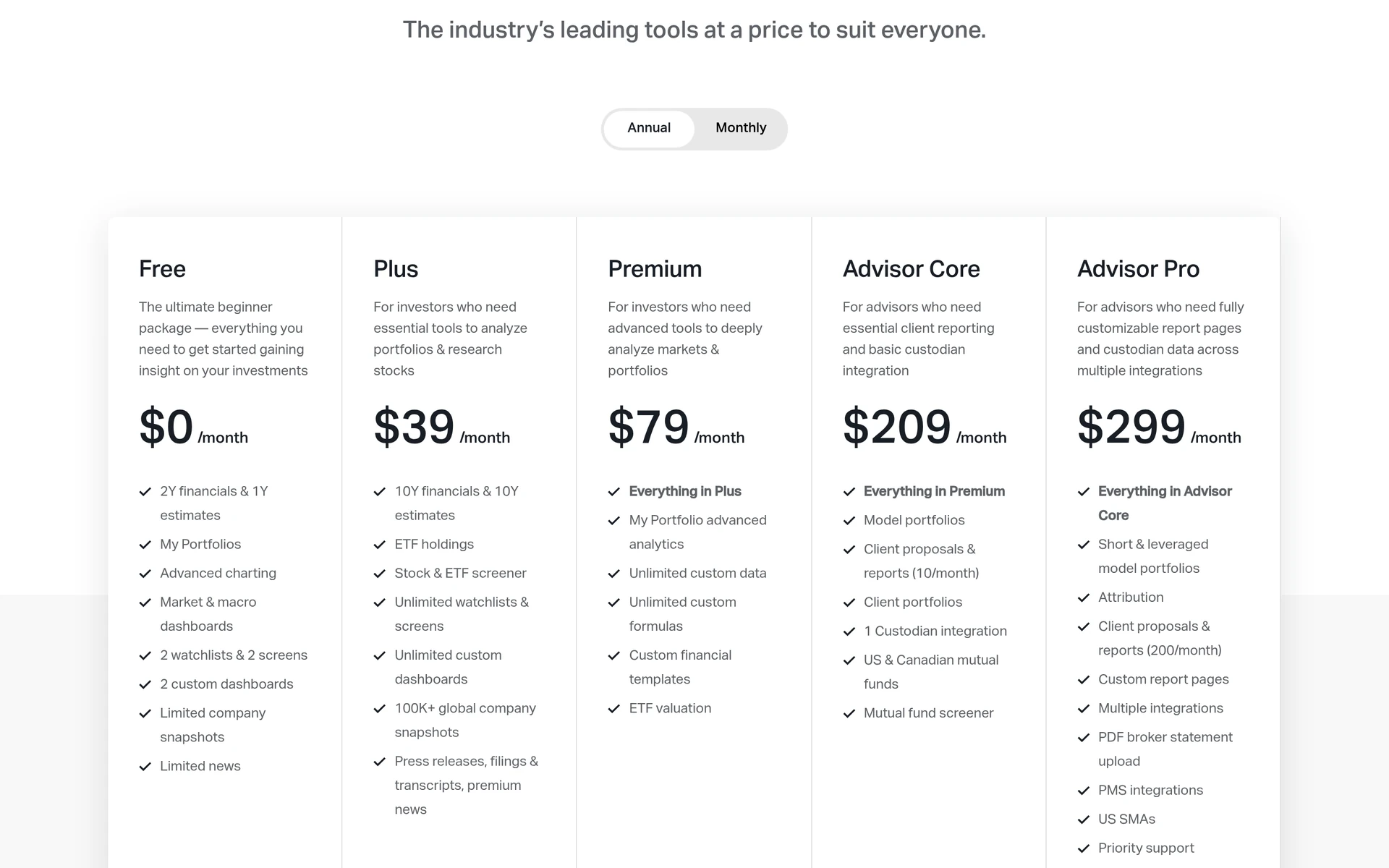
Koyfin looks and feels like a professional terminal, which is why it comes up so often as a Bloomberg alternative. You get financial statements, analyst estimates, charts, screens, news and custom dashboards in one place. We found UK, German and UAE stocks in its search, but prices outside the US and Canada are end of day.
- Free plan: 2 years of financials, 1 year of estimates, 2 watchlists, 2 screens and 2 dashboards.
- Paid: Plus from USD 39 a month and Premium from USD 79 a month, billed yearly. Koyfin offers a 7-day free trial in the app and a 30-day full refund guarantee on paid plans.
- What it lacks: its own ratings or fair values. Koyfin shows data and consensus estimates; the analysis is up to you.
See our Koyfin review or the Koyfin pricing page.
Fiscal.ai: deep company data for the price of a subscription
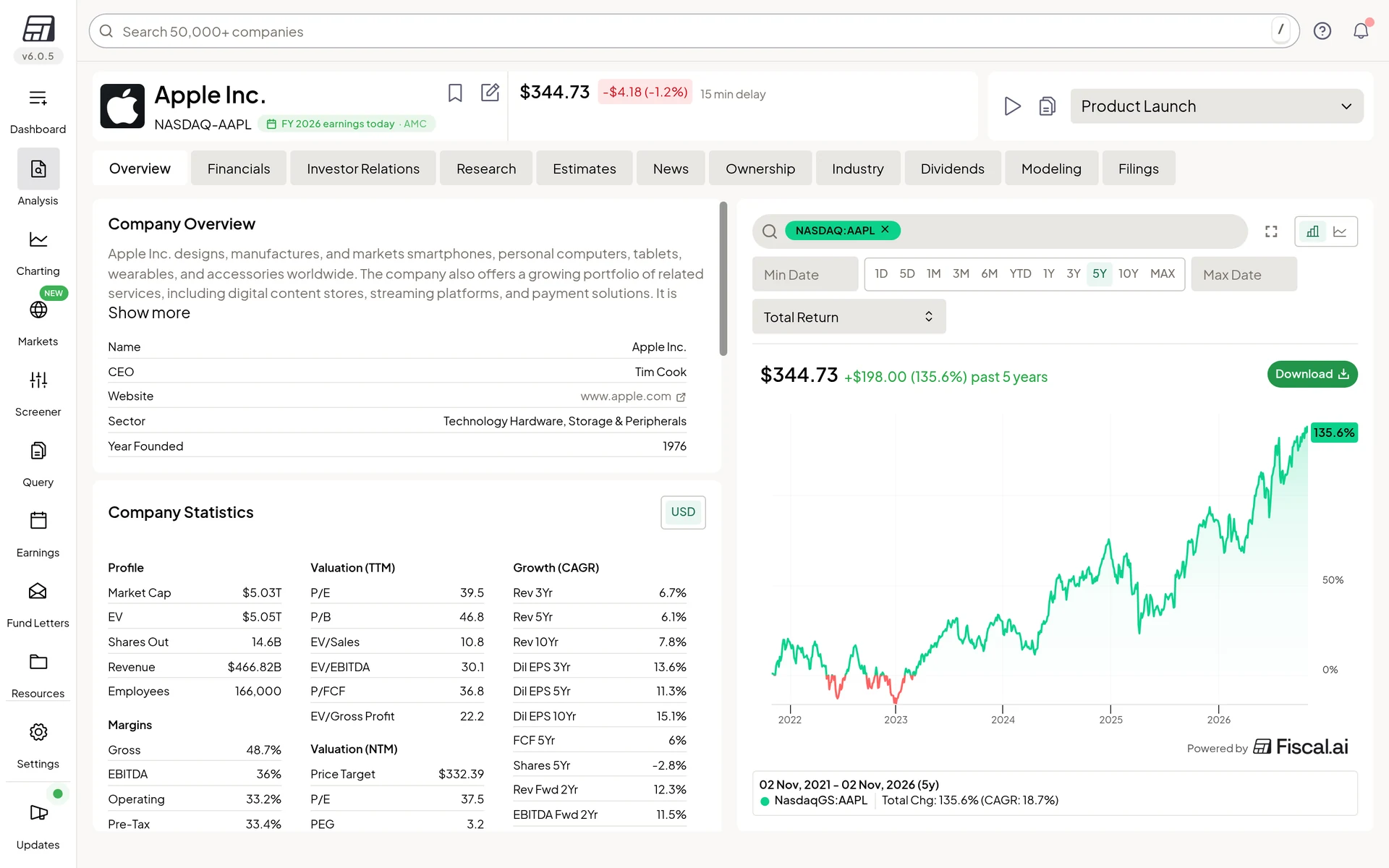
Fiscal.ai is a research terminal for reading a company’s numbers in depth. Every company page has tabs for financials, segments and KPIs, estimates, ownership, dividends, modeling and filings, plus earnings call transcripts with AI summaries. Fiscal.ai says it builds its own data for US, Canadian, UK and EU companies and ADRs, checked by human analysts, and uses S&P Capital IQ data for other markets.
- Free plan: no. There is a 7-day free trial on Pro and Max, and a card is needed at sign-up.
- Paid: Pro from USD 39 a month and Max from USD 79 a month, billed yearly. Yearly plans can be refunded within 30 days.
- What it lacks: buy or sell ratings and live trading tools. It is about the data, not about telling you what to do.
See our Fiscal.ai review.
Stock Rover: screening and research for North American stocks
Stock Rover is built for long-term investors who like to dig through numbers. Even the entry Premium plan includes screening with 300+ metrics, fundamental charts, portfolio tools with broker links and data export. Higher plans add Stock Rover’s own ratings, scores and fair value estimates.
- Free plan: yes, with basic research on individual stocks.
- Paid: Premium from USD 29 a month billed yearly. Any paid plan can be tried free for 14 days without a card.
- What it lacks: markets outside North America. It does not suit UK, EU or UAE stocks.
See our Stock Rover review or the Stock Rover pricing page.
InvestingPro: fair value estimates across many markets
InvestingPro is the paid research layer of Investing.com. It adds fair value estimates from several models, a financial health score, screeners and AI-picked strategies called ProPicks. It says it has stock data for the US and 70+ other markets, and we opened its pages for London, Xetra and Dubai stocks.
- Free plan: no InvestingPro plan is free, though Investing.com’s quote pages are.
- Paid: Pro is USD 18.95 billed monthly, or USD 227.40 a year at the regular price. New subscribers often see a lower first-year sale price.
- What it lacks: a free trial on the pricing page.
A fair value estimate is a model’s output based on assumptions that can be wrong. See our InvestingPro review and our guide on how to use WarrenAI, its AI assistant.
Yahoo Finance: the free place to start
Yahoo Finance is where many people first look up a stock. The free site gives you quotes, charts, news and portfolios for many markets, including London, Xetra and Dubai quotes we checked. The paid plans add more: Bronze covers portfolio tools, Silver adds stock picks from experts, and Gold adds CSV downloads, chart pattern tools and more screeners.
- Free plan: yes.
- Paid: Bronze from USD 7.95 a month and Gold from USD 39.95 a month, billed yearly. Gold has a 7-day free trial.
- What it lacks: the depth of the paid tools above. It is a good start, not a full research terminal.
See our Yahoo Finance review or Yahoo Finance Plus.
What none of these tools can replace
Be honest with yourself about what you need. The Bloomberg Terminal does things none of these tools try to do:
- Live data on every asset class. Bonds, currencies, commodities and derivatives in real time, not just stocks and funds.
- Instant Bloomberg. The messaging network that many people in finance use to talk to each other.
- Trading and order tools for professional desks.
- Bloomberg’s own news and research teams in one feed.
If your job needs these, the tools here are not a substitute. If you are investing your own money in stocks and funds, you probably do not need them.
How to choose
- Start free. Yahoo Finance, Koyfin and Stock Rover all have free plans. Use one for a few weeks before you pay.
- Match the tool to your market. If you hold UK, European or UAE stocks, skip Stock Rover and look at Koyfin, Fiscal.ai or InvestingPro.
- Decide how much you want done for you. Koyfin and Fiscal.ai give you data to judge yourself. InvestingPro and Stock Rover’s higher plans add their own estimates.
- Check the price after the first year. Some tools show a lower first-year sale price.
For more choices, see our best stock research platforms ranking, or answer a few questions in our tool finder.
A word on ratings and estimates
Fair values, scores and ratings in these tools are model outputs or opinions. They do not know your goals, your timeline or how much risk you can take, and they can be wrong. Use them for your own research, not as signals to buy or sell.
Frequently asked questions
What is the best Bloomberg Terminal alternative for individual investors?
For most people, Koyfin is the closest in look and feel, with charts, financials and dashboards and a real free plan. Fiscal.ai goes deeper on company financials and earnings calls, and Stock Rover is strong for screening US and Canadian stocks.
Is there a free Bloomberg Terminal alternative?
Yes, for the basics. Yahoo Finance, Koyfin and Stock Rover all have free plans. They cover quotes, charts and some company data, but not the live multi-asset data, messaging and trading tools of the Terminal.
How much does a Bloomberg Terminal cost?
Bloomberg does not publish a price. Its order page is a contact form. Industry reports put the cost at tens of thousands of US dollars a year per user, but treat any figure as an estimate.
Can individuals get a Bloomberg Terminal?
Bloomberg sells the Terminal to financial professionals and firms, and its order page asks for a business email. For a private investor, the cost is usually far more than the research is worth.
Which Bloomberg Terminal alternatives cover UK, European and UAE stocks?
Koyfin, Fiscal.ai, InvestingPro and Yahoo Finance all cover stocks outside the US. Stock Rover covers North American exchanges only. Koyfin shows end-of-day prices outside the US and Canada.
Prices at a glance
Prices from each official pricing page. Prices can differ by region and may exclude tax.
Research, not advice. This article explains how tools work. It is general information, not a recommendation to buy or sell any investment, and not personal advice. Investing puts your capital at risk and you can get back less than you put in. Prices and plans change, so check the official site before you pay.
Some links on this page are affiliate links. If you subscribe through them we may earn a commission, at no extra cost to you. We score every tool on the same published criteria, using facts from official pages and our own testing. How we make money. This page is general information, not personal investment advice.