







An earnings calendar lists the days companies are due to publish their results, usually every quarter. A typical entry shows the company, the date, whether the report comes before the open or after the close, and often an earnings-per-share estimate next to the actual figure once it is out.
This page compares the main free earnings calendars and the research tools that sit around them. Facts come from the official pages, checked on 12 Nov 2026, and can change. Dates themselves can move, so treat any calendar as a guide and confirm important dates on the company’s own investor relations page. This is general information, not advice on what to buy or sell.
For a free list of who reports this week, start with the Yahoo Finance earnings calendar or the Nasdaq earnings calendar. For analysis and transcripts around those dates, look at Seeking Alpha or Fiscal.ai.
Earnings calendar tools at a glance
| Tool | Best for | What you get | Free plan | Paid from |
|---|---|---|---|---|
| Yahoo Finance | A free weekly list with estimates | Date, call time, EPS estimate, reported EPS, surprise and market cap | Yes, the calendar is public | USD 7.95 a month billed yearly |
| Nasdaq | An official exchange calendar | A free earnings calendar with pre-market and after-hours timing | Yes | No paid calendar plan listed |
| Earnings Whispers | Confirmed dates and a “whisper” number | A free calendar and Most Anticipated list, plus paid Investor and Trader research | Yes, some calendar and news is free | Paid Investor and Trader plans. Trader has a free trial |
| Seeking Alpha | Dates plus written analysis | A public calendar with estimates and results, plus transcripts and ratings on paid plans | Yes, the calendar page is public | USD 269 for the first year |
| TradingView | A calendar you can filter by country | Time, company, estimated and actual EPS, surprise and market cap, plus price alerts | Yes, the calendar is public | USD 12.95 a month billed yearly |
| Fiscal.ai | Reading the earnings call itself | Transcripts, slides, audio, an AI summary and your own questions | No | USD 39 a month billed yearly |
| Zacks | A free calendar plus rank-based research | A public earnings calendar, with Premium research on top | Yes, a free membership | USD 249 a year |
Prices are in US dollars, from our reviews of each tool and the official pages, and can change. Check the official page before you pay.
What an earnings calendar shows
Most calendars answer four questions:
- When the company is due to report.
- When during the day the numbers come out, usually before the market opens or after it closes. Some rows say the time is not yet set.
- What analysts expected, often as an earnings-per-share (EPS) estimate.
- What the company reported, and whether that figure was above or below the estimate (the “surprise”).
A beat or a miss is only a comparison with an estimate. It is not a reason on its own to buy or sell, and prices can still move the other way. Different calendars can also disagree on a date, especially when a company has not confirmed it yet.
Yahoo Finance: the best free starting point
Yahoo Finance publishes a Company Earnings Calendar that you can open without paying. You can view a date range, search for one company, and also open IPO and stock split events from the same calendar area, as described in Yahoo’s help article.
On 12 Nov 2026 the table showed the symbol, company name, event name, earnings call time, EPS estimate, reported EPS, surprise and market cap. Call times were marked in short codes such as before the open, after the close, or time not supplied.
- What is free: the earnings calendar, plus quotes, news and portfolios.
- Paid: from USD 7.95 a month billed yearly. Gold has a 7-day free trial.
- Suits: anyone who wants a free weekly list with estimates and results.
- Less suited to: people who want a written recap of the call, or a second “whisper” number beside the consensus.
See our Yahoo Finance review.
Nasdaq: a free official calendar
Nasdaq publishes a free Earnings Calendar on its market activity pages, next to its economic, dividend, IPO and stock-split calendars. The page marks timing as pre-market, after hours, or time not supplied.
When we opened it on 12 Nov 2026 the table structure was visible, but the day’s rows did not load in our browser, so we have not listed that day’s companies from Nasdaq. Use the official page itself for the live list.
- What is free: the calendar on nasdaq.com. No paid calendar plan is listed on that page.
- Suits: investors who want an official exchange calendar.
- Less suited to: anyone who also wants estimates, transcripts or alerts in the same tool.
Earnings Whispers: dates plus a whisper number
Earnings Whispers is built around earnings dates and expectations. The public homepage shows a weekly calendar, split into before the open and after the close, and a Most Anticipated Earnings Releases list. It also publishes an Earnings Whisper number, which it presents as a measure of what investors actually expect, next to the usual Wall Street consensus.
Some calendar and news content is free. A free account, the site says, lets you create a watchlist and receive weekly calendars and daily summaries. Paid research sits on two plans, Investor and Trader. Official terms of service, dated 10 Oct 2026, say some research needs a paid subscription, the Trader service has a free trial, and the Investor service does not. We did not find public retail prices on the official pages we opened, so we do not quote a figure here. There is a separate institutional data service with its own list prices, aimed at firms rather than individual investors.
- What is free: a public calendar and news, plus a free account for a watchlist and email calendars.
- Paid: Investor and Trader research plans. Check the official site for current prices. Trader has a free trial; Investor does not.
- Suits: investors who want confirmed dates and a second expected number besides the consensus.
- Less suited to: anyone who only needs a simple this-week list, which Yahoo Finance or Nasdaq already provide for free.
A whisper number, like a consensus estimate, can be wrong. It is a starting point for your own reading, not a signal to trade.
Seeking Alpha: the calendar plus written analysis
Seeking Alpha has a public Earnings Calendar with a week view. On 12 Nov 2026, opened without signing in, it listed companies with report timing (before the open, after the close, or during the market), market cap, EPS estimates, reported figures and a beat or miss count. The same earnings section also points to earnings call transcripts and insights.
The free Basic account already includes news, portfolios, price alerts and watchlists. Premium adds Quant Ratings, written analysis from contributors and the Ask Seeking Alpha AI assistant, which is useful when you want to read around a report rather than only see the date.
- What is free: the earnings calendar page we opened, plus a Basic account with news, portfolios and price alerts.
- Paid: Premium at USD 269 for the first year, with a 7-day free trial for new subscribers.
- Suits: investors who want the calendar and then a written take on the same companies.
- Less suited to: stocks listed only outside the US, which Quant Ratings do not cover.
See our Seeking Alpha review.
TradingView: a calendar you can filter, with alerts
TradingView’s Earnings Calendar is a public table of latest and upcoming reports. The official help text on that page says each row includes the report time, company name, estimated and actual EPS, the surprise and market cap. You can filter by time period, country and time zone, so you can look at US reports only or watch a wider set of markets.
The same app can notify you when a price hits a level you set. The free Basic plan includes 3 active price alerts. That combination, a calendar plus alerts, is the main reason traders use TradingView around earnings, not the calendar alone.
- What is free: the earnings calendar, charts with tight limits, and 3 active price alerts.
- Paid: Essential from USD 12.95 a month billed yearly, with 20 active price alerts. Higher plans raise the alert limits further. See our guide to stock alert apps for the full alert comparison.
- Suits: people who already use TradingView for charts and want the calendar and alerts in one place.
- Less suited to: anyone who wants a written recap of the earnings call.
See our TradingView review.
Fiscal.ai: for reading the earnings call
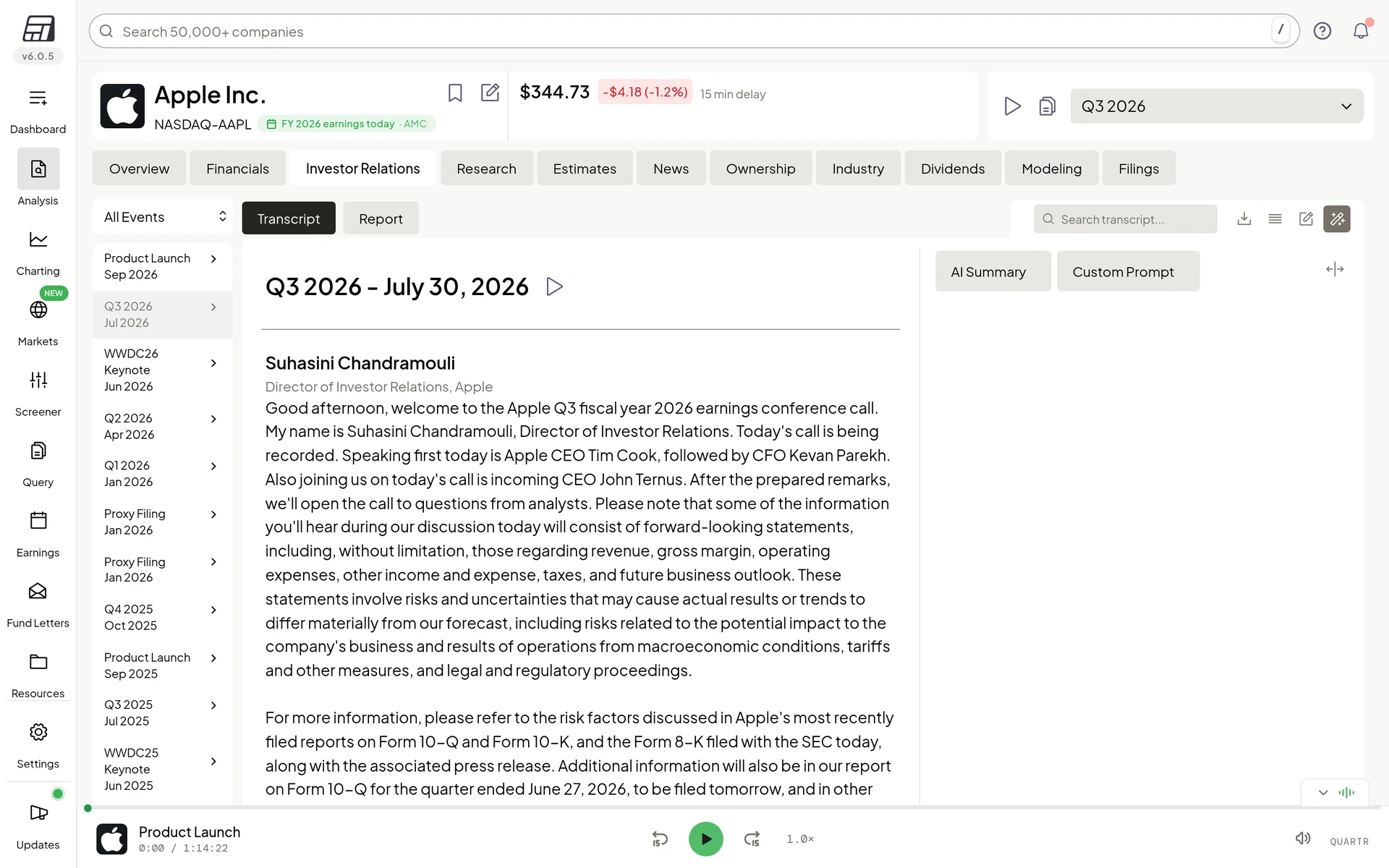
Fiscal.ai is not a weekly calendar first. It is a research terminal for people who want to read the results and the call. Its Investor Relations tab lists past earnings events with the transcript, slides and audio. An AI Summary sits next to the transcript, and a Custom Prompt box lets you ask your own question. Answers are marked as AI generated and can contain mistakes, so check key numbers in the transcript.
- Free plan: none. Some company pages open without an account.
- Paid: Pro from USD 39 a month billed yearly, with a 7-day free trial (a card is needed). Pro covers 10 events (calls, transcripts and slides); Max covers 30+.
- Suits: investors who already know which company they want to study and want the call, not just the date.
- Less suited to: a quick scan of who reports this week.
See our Fiscal.ai review.
Other useful calendars
Investing.com publishes an earnings calendar. We could not load the full table in this check, so we do not describe its columns here. InvestingPro, the paid research plan from the same company, adds fair value estimates and WarrenAI chat around the companies you follow. Paid InvestingPro plans start at USD 18.95 a month billed yearly. Up to 55% off in the Early Bird sale until 24 Nov, 8pm Dubai time, plus an extra 15% with code SRH. See our InvestingPro review.
Zacks has a public earnings calendar. A free membership includes a portfolio tracker and email alerts. Zacks Premium, which adds the Zacks Rank lists and premium screens, is USD 249 a year, with a 30-day free trial. See our Zacks review.
TipRanks is stronger on analyst consensus than on a standalone calendar. The free Basic plan includes watchlist email alerts for 5 stocks (30 on Premium). Premium starts at USD 29.95 a month billed yearly. See our TipRanks review.
How to choose
- You want a free list for this week: Yahoo Finance, or Nasdaq for an official exchange calendar.
- You want a second expected number besides the consensus: Earnings Whispers.
- You want written analysis next to the date: Seeking Alpha.
- You want the calendar and price alerts in one app: TradingView.
- You want to read the call, slides and an AI summary: Fiscal.ai.
- You already follow Zacks ranks: the Zacks earnings calendar.
Start with a free calendar. Pay only if you will use the extra research. An earnings date, estimate or surprise is a fact to check, not a recommendation.
Frequently asked questions
What is an earnings calendar?
It is a list of when publicly traded companies are scheduled to publish their results, usually each quarter. Many calendars also show the time of day, an EPS estimate and the reported figure once it is released.
What is the best free earnings calendar?
Yahoo Finance is the most complete free starting point we checked: a public calendar with estimates, results, surprise and market cap, plus a search by symbol. Nasdaq publishes a free official calendar too. Earnings Whispers is also free to browse for dates and its Most Anticipated list.
What is a whisper number?
On Earnings Whispers, the Earnings Whisper is the site’s own figure for what investors are expected to treat as the true target, published next to the usual consensus estimate. It can differ from the consensus, and either figure can be wrong.
When do companies report earnings?
Most listed companies report every quarter. US reports often come out before the market opens or after it closes. The exact date is set by the company and can change, so confirm it on the company’s investor relations page if it matters to you.
Do I need a paid tool to follow earnings?
No. Yahoo Finance, Nasdaq, TradingView, Seeking Alpha’s public calendar, Zacks and the public Earnings Whispers calendar are all free to open. Paid tools help when you want analysis, transcripts, ratings or more alerts around those dates.
Prices at a glance
Prices from each official pricing page. Prices can differ by region and may exclude tax.
Research, not advice. This article explains how tools work. It is general information, not a recommendation to buy or sell any investment, and not personal advice. Investing puts your capital at risk and you can get back less than you put in. Prices and plans change, so check the official site before you pay.
Some links on this page are affiliate links. If you subscribe through them we may earn a commission, at no extra cost to you. We score every tool on the same published criteria, using facts from official pages and our own testing. How we make money. This page is general information, not personal investment advice.